
Which version of the Strum Fix Plus should I get?
People often ask which Strum Fix Plus to get, and while it’s a very subjective topic since a lot depends on your personal preferences, past experience, and playing style, I’ll try to lay out the main differences below to help you make a decision.
Summary of Strum Fix Plus versions:
Strum Fix Plus 1 - discontinued, replaced by SFP2.
Strum Fix Plus 2 - discontinued. Uses “dome style” tactile switches (not keyboard switches). Short travel.
Strum Fix Plus 3 - discontinued, replaced by SFP4.
Strum Fix Plus 4 - still supported, but is being replaced by SFP5. Uses low-profile, linear mechanical keyboard switches. Long travel.
Strum Fix Plus 5 - Uses low-profile mechanical keyboard switches (linear or tactile) and ball bearings. Medium travel.
How does the travel differ?
The “travel” is defined as the amount the strum bar has to rotate to activate the up or down strum switch. Longer travel means you are less likely to “overstrum” (accidentally strum in the opposite direction when letting go of the strum bar), while shorter travel means you don’t have to rotate the strum bar as far to activate a switch.
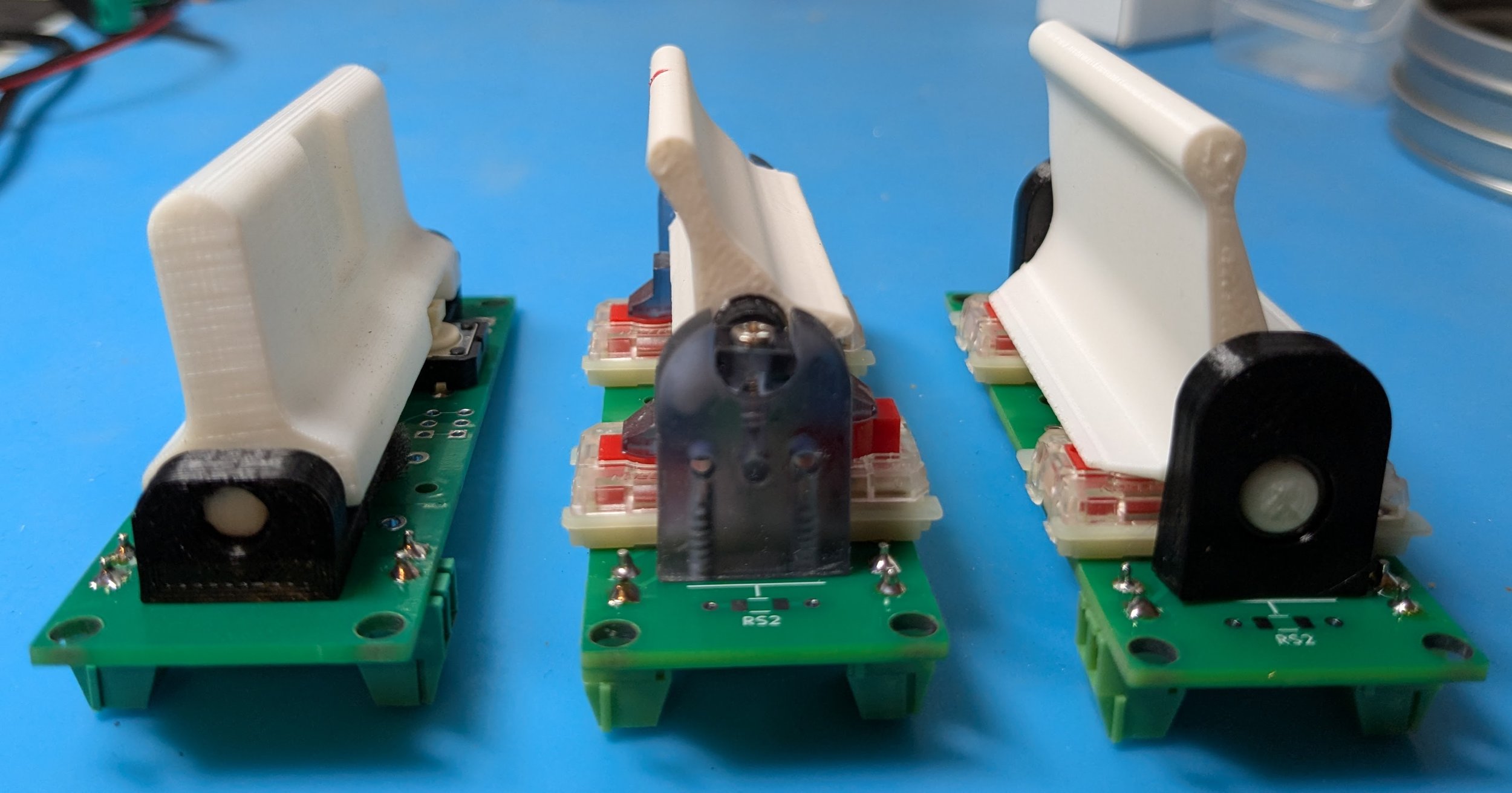
Strummer Travel Comparison
This picture shows a SFP2 (left), SFP4 (center) and SFP5 (right) with their strum bars fully rotated to their hard stops — the switches activate slightly before hitting the hard stops:
What’s the difference between linear and tactile switches?
The Strum Fix Plus 5 can be supplied with either linear or tactile mechanical keyboard switches. The Strum Fix Plus 3 and 4 used linear switches, while the Strum Fix Plus 2 used tactile switches.
Both types of switches are very similar and have the same amount of travel, the main difference is in how they “activate”, that is how the switches make contact when they are pressed and what sound (if any) they make.
Linear switches provide a quiet, smooth, and consistent keystroke without any tactile feedback so you can’t feel exactly when the switch is activated. In gaming applications you are usually pressing the switch all the way anyhow.
Tactile switches, on the other hand, have a noticeable bump during the keypress, offering feedback lets you know when a key has been activated. They do make a slight clicking sound which some people find annoying.
This website has more info: https://keyboardguides.com/keyboard-switches-explained/